



DurcTools |
Post Reply 
|
Page <1 192021 |
| Author | |
Tensmoor 
Postmaster General 

Joined: 07 Apr 2015 Location: Scotland Status: Offline Points: 1897 |
 Post Options Post Options
 Thanks(1) Thanks(1)
 Quote Reply Quote Reply
 Posted: 06 Feb 2024 at 07:44 Posted: 06 Feb 2024 at 07:44 |
|
New Tool/Functionality On the Cast Spell page any items you are short of will now be highlighted with a pale red background as shown below. 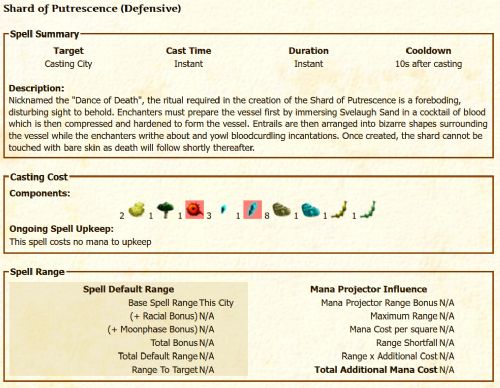 This happens automatically whenever you view that page however, its accuracy is completely dependant on the last time you viewed the sub-inventories in that town. While basic res holdings are updated automatically anything that is only shown in the sub panels at the bottom of your town inventory page can only be updated when you view them. So if you want the best from this you need to view them often. I'll also be looking to add similar functionality to the various production/train units pages. Tens
|
|
 |
|
|
Tensmoor
Postmaster General
Joined: 07 Apr 2015 Location: Scotland Status: Offline Points: 1897 |
Post Options
Thanks(0)
Quote Reply
Posted: 12 Jun 2024 at 07:24 |
|
Trivia Filter Tool Update The Trivia Filter tool has been updated to reflect that this is now run by House Fenring. Instead of copying the posts to a separate window each post by House Fenring will have an orange background. This is shown below but using me instead of House. This tool is set to disabled each time you log in so that you can only have this happening during Trivia. 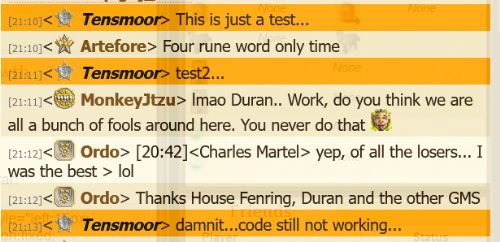 |
|
|
|
|
Kojak
New Poster 
Joined: 05 Feb 2012 Location: USA Status: Offline Points: 10 |
Post Options
Thanks(0)
Quote Reply
Posted: 12 Jun 2024 at 07:26 |
|
LOVELY, Tens! Thank you SO MUCH!
|
|
|
|
|
Tensmoor
Postmaster General
Joined: 07 Apr 2015 Location: Scotland Status: Offline Points: 1897 |
Post Options
Thanks(0)
Quote Reply
Posted: 07 Jul 2024 at 08:16 |
|
For those without Durctools who are trying to find the FT locations these are them for 07 July 2024: |
|
|
|
|
Tensmoor
Postmaster General
Joined: 07 Apr 2015 Location: Scotland Status: Offline Points: 1897 |
Post Options
Thanks(0)
Quote Reply
Posted: 08 Jul 2024 at 08:28 |
|
For those without Durctools who are trying to find the FT locations these are them for 08 July 2024: |
|
|
|
|
Tensmoor
Postmaster General
Joined: 07 Apr 2015 Location: Scotland Status: Offline Points: 1897 |
Post Options
Thanks(1)
Quote Reply
Posted: 08 Aug 2024 at 12:53 |
|
Tool Upgrade Upgrade to the Collectable Scan tool so it now also tells you the terrain, combat terrain and if present the biome. 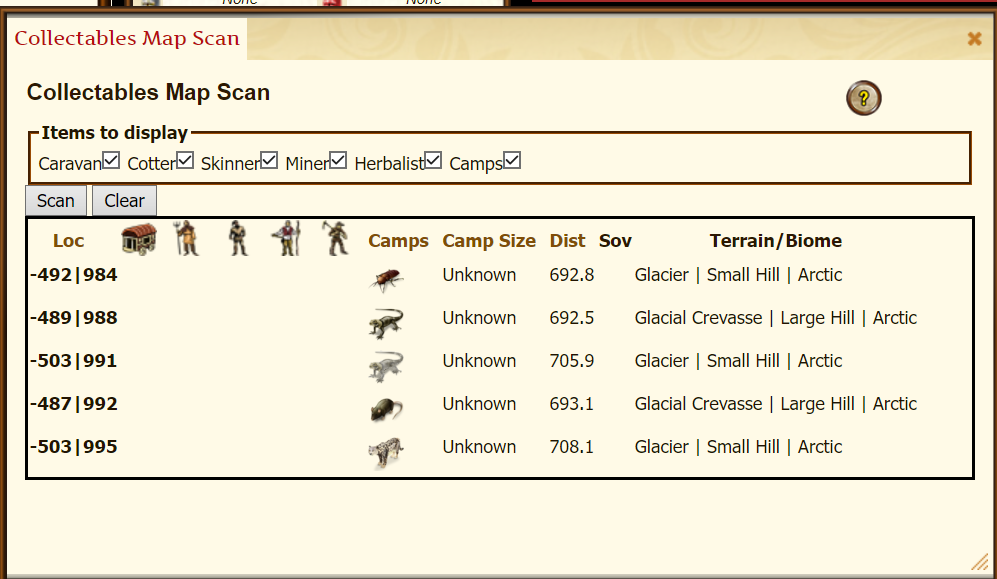 |
|
|
|
|
Tensmoor
Postmaster General
Joined: 07 Apr 2015 Location: Scotland Status: Offline Points: 1897 |
Post Options
Thanks(0)
Quote Reply
Posted: 29 Sep 2024 at 18:34 |
|
New Tool Filterable Encampments with camp size (within diplo visibility range otherwise Unknown).  If you scroll down through the results the column headings (and everything above) remain visible. You can also sort by the NPC/Player, Size and Distance columns.
|
|
|
|
|
Tensmoor
Postmaster General
Joined: 07 Apr 2015 Location: Scotland Status: Offline Points: 1897 |
Post Options
Thanks(0)
Quote Reply
Posted: 17 Mar 2025 at 11:05 |
|
New version of the tool for changing the colours in Illy Chats My first attempt at a tool that allows you to change the colours of backgrounds & text in Illy chats was very buggy and limited. I've now completely re-written it and it now works in GC, AC and PC. It allows you to set your own colours for the time, text, all the various roles (player, you, GM etc), diplo indicators and background colours for posts, mentions and trivia as well as being able to set the transparency for all of them (different to turning transparency on/off in https://elgea.illyriad.co.uk/#/Communication/Chat On the left side there are 3 chat windows showing what it will look like with the default colours, your current theme and the theme you are working on. Once you are happy with your theme click the Apply Theme button and make sure the Theme Enabled toggle is set to on. You can disable the theme by setting the toggle to off. you don't need to re-load Illy when you toggle it on/off. The tool can be found under the Mail/chat tools in the tools menu. Any issues mail me in-game (Tensmoor) Tens |
|
|
|
|
Tensmoor
Postmaster General
Joined: 07 Apr 2015 Location: Scotland Status: Offline Points: 1897 |
Post Options
Thanks(0)
Quote Reply
Posted: 17 Mar 2025 at 11:17 |
|
My bad... you will need to re-install durctools to get the updated version. |
|
|
|
|
Tensmoor
Postmaster General
Joined: 07 Apr 2015 Location: Scotland Status: Offline Points: 1897 |
Post Options
Thanks(0)
Quote Reply
Posted: 24 Apr 2025 at 18:50 |
|
Map Overlays (Notes, town radii etc) Update The updated version of the tool for showing extra info on the map is now live. 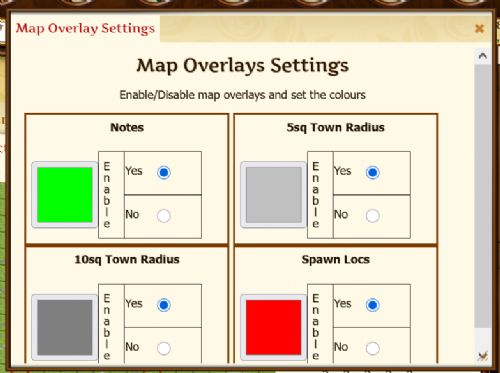 At present it is still only the same 4 things you can show but I'm working on some other possible things to show. Any issues either grab me in GC or send me an IGM. Tens
|
|
|
|
|
Post Reply
|
Page <1 192021 |
 Tweet
Tweet
|
| Forum Jump | Forum Permissions You cannot post new topics in this forum You cannot reply to topics in this forum You cannot delete your posts in this forum You cannot edit your posts in this forum You cannot create polls in this forum You cannot vote in polls in this forum |


 Topic Options